Choose INIU P62 if you mainly want a smaller 65W power bank for everyday laptop use.
Travel & Work Gear / Comparison
Best Laptop Power Banks for Work & Travel in 2026
A fit-based comparison of five USB-C laptop power banks for lighter everyday carry, 100W value, cable convenience, 140W single-device charging, and premium multi-device power.
A laptop power bank is useful only if its single-port output, capacity, weight, and power distribution match the way you actually work.
A 65W model can be enough for many thin-and-light laptops. A 100W model gives you more headroom without automatically becoming huge. A 140W model makes sense only if your laptop can actually accept that much USB-C power. And if you regularly charge two high-power devices at once, total output matters just as much as the wattage printed beside one port.
We compared five current options that solve those needs differently: INIU P62 20K / 65W, INIU P63 25K / 100W, Anker Laptop Power Bank 25K / 165W, Anker 737 Power Bank, and Anker Prime Power Bank 26K / 300W.
There is no universal winner here. Start with your laptop's charging requirement, then decide how much extra weight and cost you are willing to carry for more capacity, built-in cables, or multi-device power.
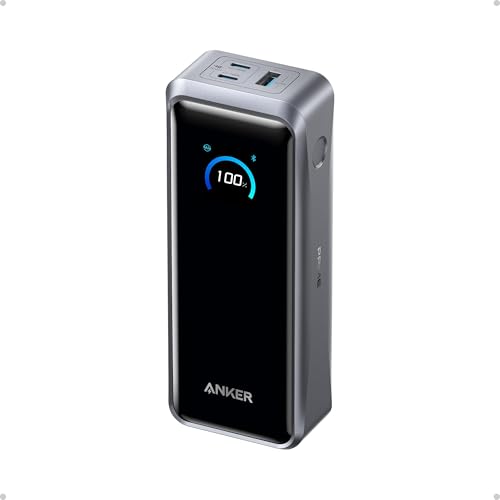
Nolmira may earn a commission when you buy through qualifying links on this page. That does not change which products we include or how we describe their trade-offs.
01 / Quick answer
Quick Answer
Choose INIU P63 if you want 100W laptop charging and 25,000mAh capacity without carrying a roughly 1.3-pound power bank.
Choose Anker Laptop Power Bank 25K if built-in cables and multi-device convenience matter more than maximum single-port output.
Choose Anker 737 if your laptop can genuinely benefit from up to 140W from one USB-C port.
Choose Anker Prime 26K if you regularly need to power two high-wattage USB-C devices at the same time and are willing to pay for a 300W total power budget.
02 / Comparison
Laptop Power Bank Comparison
| Product | Capacity | Max single-port output | Multi-device / total output | Ports | Weight | Best fit |
|---|---|---|---|---|---|---|
| INIU P62 | 20,000mAh / 73Wh | 65W | Up to 45W + 25W across two USB-C ports | 2× USB-C + 1× USB-A | about 11–11.4 oz | Compact everyday laptop charging |
| INIU P63 | 25,000mAh / 92.5Wh | 100W | Up to 65W + 45W across two USB-C ports | 2× USB-C + 1× USB-A | 13.8 oz | Value-focused 100W laptop charging |
| Anker Laptop Power Bank 25K | 25,000mAh / 90Wh | 100W | 165W max total; 130W max with 3–4 devices | 2 built-in USB-C cables + 1 USB-C + 1 USB-A | 21 oz / 595g | Work and travel convenience |
| Anker 737 Power Bank | 24,000mAh | 140W | 140W max total | 2× USB-C + 1× USB-A | about 21.4 oz / 607g | One high-power USB-C laptop |
| Anker Prime Power Bank 26K | 26,250mAh / 99.75Wh | 140W | 300W max total; up to 140W + 140W on two USB-C ports | 2× USB-C + 1× USB-A | 21.12 oz / 600g | Two high-power devices at once |
Maximum charging speed depends on the laptop, cable, USB-PD profile, battery level, temperature, and how many devices are connected.
65Weveryday laptop
100Wbroader laptop headroom
140Whigh-power single laptop
300W totalmultiple high-power devices
03 / Evidence transparency
How We Compared
We did not personally benchmark these power banks in a lab.
Instead, we compared manufacturer specifications, port-level power allocation, battery capacity and watt-hour ratings, physical size and weight, charging features, and patterns in Amazon owner feedback supplied for this research.
Customer reviews are useful for identifying recurring complaints such as charging instability, premature failure, display behavior, cable durability, or unexpectedly high weight. They are less reliable for proving exact electrical performance, because charging speed changes with the receiving device, cable, USB-PD profile, battery state, temperature, and test method.
Several Amazon listings also combine reviews across related variants or bundles. Where that happens, we treat the review pool as a directional signal rather than assuming every comment applies to one exact model.
Product fit
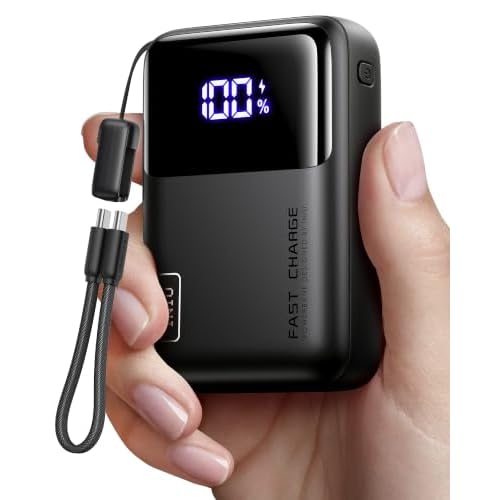
INIU P62 20,000mAh / 65W
Best for: A smaller power bank when 65W is already enough
The P62 is the simplest option in this comparison.
It carries 20,000mAh / 73Wh, reaches up to 65W from its primary USB-C port, and is meaningfully lighter than the roughly 600g Anker models later in this guide. That makes it easier to justify as an everyday bag power bank when you do not need 100W or 140W charging.
Its advantage is not maximum performance. It is avoiding more battery, weight, and wattage than you need.
For users with a USB-C laptop that normally charges around the 45W–65W range, that can be a sensible trade.
Where the 65W headline changes
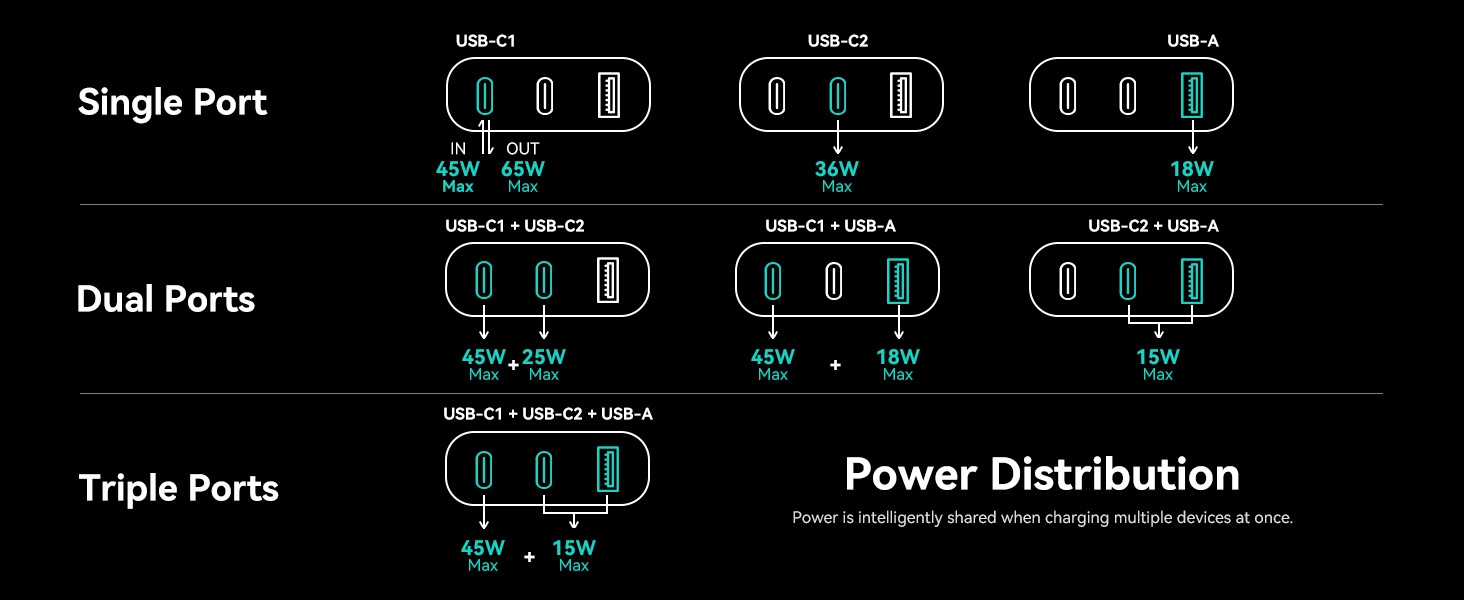
The main USB-C port can reach 65W when used on its own. With two USB-C devices connected, INIU's own power-distribution graphic shows the available power splitting to 45W + 25W.
That matters if you plan to charge a laptop and a second USB-C device simultaneously. A three-port power bank does not mean every connected device receives its maximum charging rate at the same time.
Trade-offs
Amazon feedback is broadly positive around size, portability, and performance, but charging speed and durability are more mixed.
The low-star review pool includes reports of inconsistent laptop charging, lower-than-expected speeds with particular devices, batteries losing performance over time, and units failing after months of use.
Some individual reviews also try to judge the 20,000mAh rating by comparing it directly with the amount transferred into another device. That is not a reliable one-to-one test: the advertised mAh figure refers to the power bank's internal cells, while voltage conversion, heat, circuitry, and charging losses reduce the energy that reaches the receiving device.
The more useful concern is that long-term durability and laptop-charging consistency are recurring negative themes in the shared review pool.
Choose the P62 if: you value compact size and 65W is already enough for your laptop.
Consider another option if: you expect to charge a more demanding laptop and a second device at higher speed at the same time.
Check Price on AmazonProduct fit
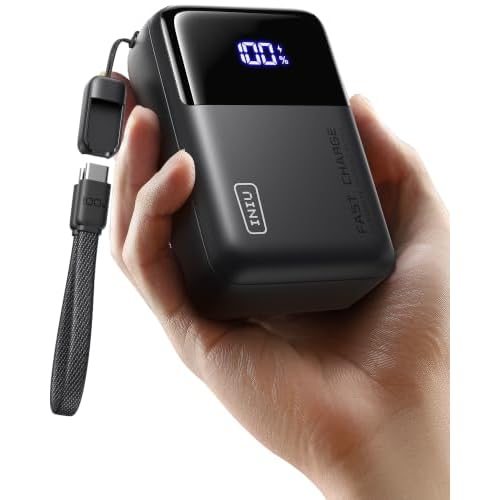
INIU P63 25,000mAh / 100W
Best for: 100W laptop charging without the weight of the larger Anker models
The P63 is the clearest value option in this group.
It raises capacity to 25,000mAh / 92.5Wh, increases the primary USB-C output to 100W, and weighs 13.8 ounces according to the supplied product comparison material.
That combination is why it stands out. You get substantially more laptop-charging headroom than the P62 while staying well below the weight of the large Anker models.
Better suited to a laptop-first setup
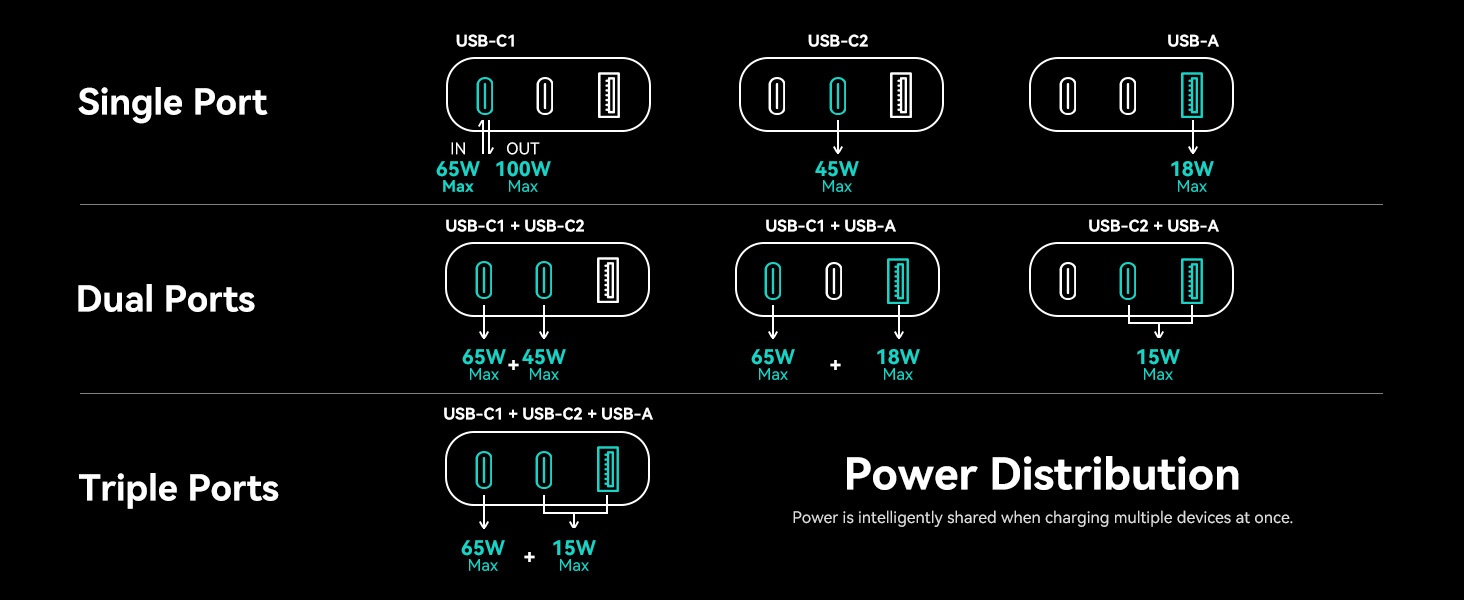
With one compatible device connected, the main USB-C port can deliver up to 100W. With both USB-C ports in use, the manufacturer power-distribution graphic shows 65W + 45W.
That makes the P63 more flexible than the P62 when a laptop is sharing the bank with another USB-C device, even though multi-device charging can still reduce the primary port below the headline 100W figure.
Trade-offs
The lower price comes with more uncertainty than the premium Anker options.
Recurring low-star feedback includes questions about battery-percentage accuracy, faster-than-expected discharge near the lower end of the charge range, inconsistent high-power charging with some devices, and premature failures.
As with the P62, some capacity complaints use imperfect testing methods. It would be too strong to conclude that the battery's 25,000mAh rating is false from those reviews alone.
The better-supported takeaway is that battery behavior, sustained high-power delivery, and long-term reliability receive mixed feedback in the shared listing.
Choose the P63 if: you want 25K capacity and up to 100W laptop charging while keeping weight and price under control.
Consider another option if: you prioritize the strongest long-term reliability record over value.
Check Price on AmazonProduct fit
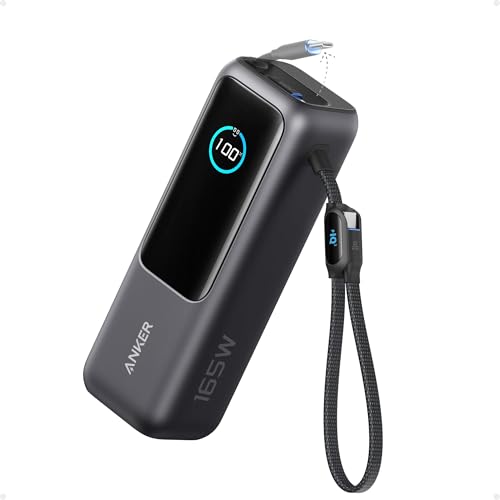
Anker Laptop Power Bank 25K / 165W
Best for: Work and travel with fewer loose cables
The Anker 25K takes a different approach.
Its biggest advantage is not single-port wattage. Each USB-C cable or port tops out at 100W, while the power bank can deliver up to 165W total across multiple devices. Anker also integrates two USB-C cables, adds another USB-C port and USB-A port, and supports charging up to four devices.
That makes it particularly useful for work trips where eliminating separate USB-C cables matters.
165W total does not mean 165W to one laptop
This is one of the easiest specifications to misunderstand.
The bank can provide 165W across two devices, but one USB-C connection tops out at 100W. Anker states that the maximum total falls to 130W when three or four devices are charging simultaneously.
So if your laptop can actually accept 140W, the Anker 737 is the more appropriate single-device high-power option. If you instead carry a laptop, phone, tablet, and accessories and value fewer loose cables, the 25K 165W is more convenient.

Trade-offs
At 21 ounces / 595g, it is travel-friendly in organization, not in weight.
The most notable recurring concern in the supplied low-star feedback is the durability of the built-in cable system. A built-in cable is more convenient while it works, but it also creates a component that is not as easy to replace as a separate cable.
That trade-off is central to this model: you are paying for a cleaner travel setup, not a lighter power bank or higher single-port wattage.
Choose the Anker 25K if: built-in cables and multi-device convenience are more valuable to you than maximum laptop wattage.
Consider another option if: you want the lightest bank possible or need more than 100W from one port.
Check Price on AmazonProduct fit
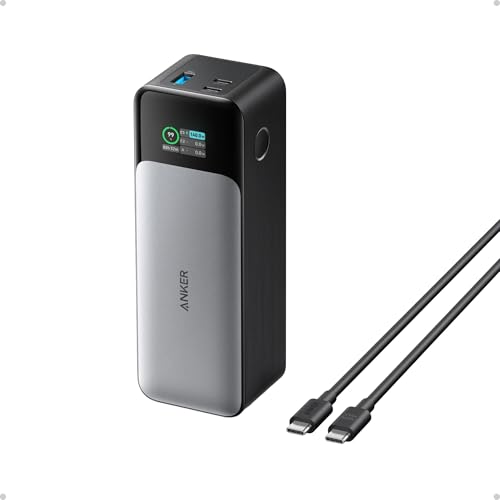
Anker 737 Power Bank / 24K / 140W
Best for: One laptop that can actually use 140W USB-C charging
The Anker 737 is the most focused high-power single-laptop option here.
Anker specifies 24,000mAh, two USB-C ports, one USB-A port, and 140W maximum total output. Either USB-C port can support the higher-voltage 28V profile used for up to 140W charging when the connected device and cable support it.
That distinction matters. The Anker 25K has a larger-looking 165W total-output number, but the 737 can provide more power to one compatible USB-C laptop.
Who actually needs 140W?
Not everyone.
A thin-and-light laptop that accepts 45W, 65W, or 100W will not charge at 140W simply because the power bank can provide it. The 737 makes more sense when you already own a laptop that supports higher USB-C PD input and want a power bank capable of matching it.
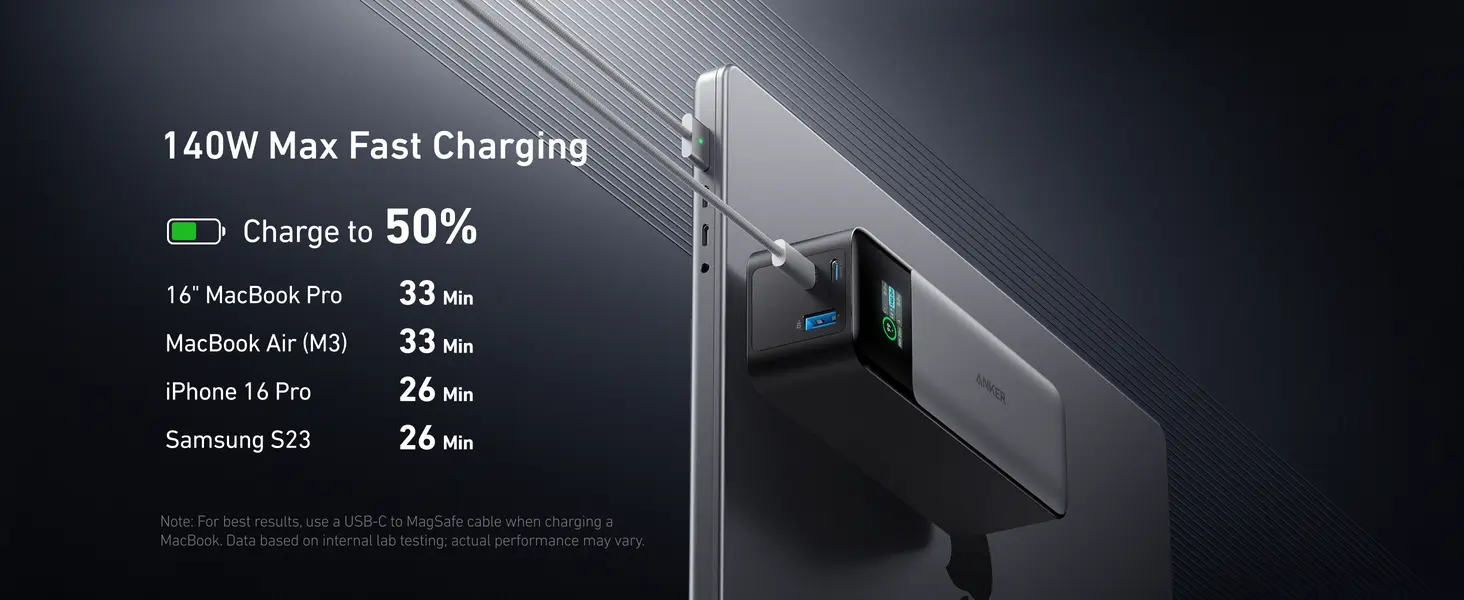
Its integrated display is also more informative than a basic percentage meter because it can show real-time charging data.
Trade-offs
The first is obvious: weight. Anker's current service specification lists 607g, putting it in the same heavy bag-carry class as the Prime 26K.
The more important long-term consideration is owner feedback. While the overall rating is strong, the supplied low-star pool contains recurring reports of battery degradation, units failing after months or years, charging-management glitches, and some devices becoming difficult to recover after deep discharge.
Those reports do not outweigh the much larger positive review base, but they are a real trade-off for an expensive power bank.
Choose the Anker 737 if: your laptop can benefit from up to 140W from one USB-C port.
Consider another option if: your laptop only needs 65W–100W or low weight matters more than peak single-port power.
Check Price on AmazonRead the Anker 737 review →Product fit
Anker Prime Power Bank 26K / 300W
Best for: Two high-power USB-C devices at the same time
The Prime 26K is the outlier in this group.
It has 26,250mAh / 99.75Wh, two USB-C ports, one USB-A port, up to 140W from a single USB-C port, and up to 300W total output. Anker's current specification lists a weight of 600g.
The reason to pay for it is not simply that 300W is larger than 140W. It is that its power budget is designed for multiple high-demand devices at once.
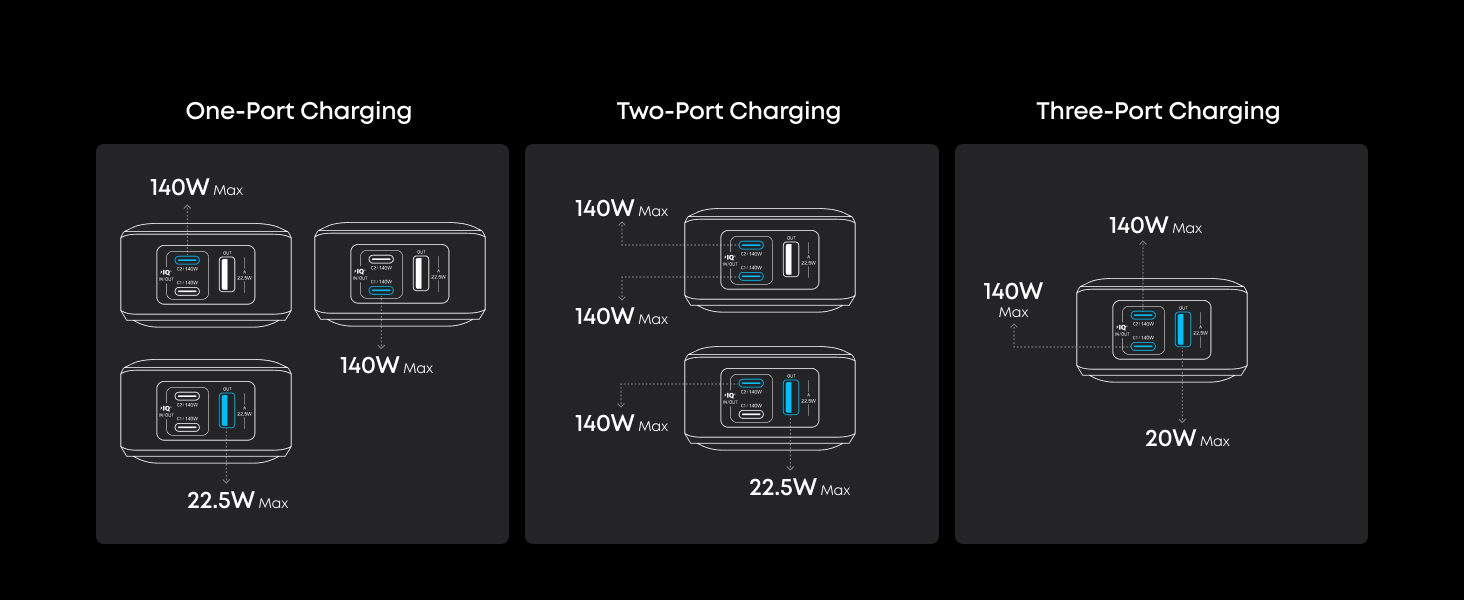
The supplied port-distribution graphic shows both USB-C ports able to provide up to 140W each simultaneously, with the USB-A port contributing up to 20W in a three-device setup.
For someone carrying two high-power USB-C devices, that solves a problem the other models in this guide cannot.
Extremely fast recharging — if your setup can support it
Anker also advertises up to 250W dual-port input, with a 50% recharge in about 13 minutes under its internal test conditions.
Reaching that figure requires both USB-C ports, suitable 5A cables, and high-power chargers. Anker itself notes that the result depends on the charging setup.
So 250W input is a useful capability for a power user with the right hardware, not something every buyer will experience by plugging in one ordinary wall charger.
Trade-offs
The price is the biggest one.
At around $230 in the listing reviewed for this research, it is difficult to justify for someone who only needs to recharge one normal laptop.
Its more advanced power-management system also adds complexity. Low-star owner reports supplied for this research include device-specific protection errors, port errors, intermittent charging, and isolated port failures. Some reviews refer specifically to the optional charging base; those base-specific complaints should not be attributed to the power bank itself.
Overall customer sentiment on the listing is still strongly positive, but the Prime makes sense only when you genuinely need the capability you are paying for.
Choose the Prime 26K if: you routinely charge multiple high-power USB-C devices and want one battery to handle the workload.
Consider another option if: you normally charge one laptop. You would be paying a large premium for power you may never use.
Check Price on Amazon65W vs 100W vs 140W: How Much Power Does Your Laptop Need?
More wattage is not automatically better.
The correct number depends first on what your laptop accepts over USB-C.
65W is a practical everyday range for many thin-and-light laptops.
100W gives you more flexibility for larger laptops and heavier workloads while still being common in portable power banks.
140W becomes useful only when a compatible laptop can actually negotiate that level through USB-C Power Delivery.
The safest buying method is to check the wattage of your laptop's original charger or its official USB-C charging specification, then choose a power bank that can meet that requirement on one port.
65WMany thin-and-light laptops
100WMore headroom for larger laptops
140WOnly with a compatible USB-C PD laptop
Single-Port Output vs Total Output
These are not interchangeable specifications.
A power bank can advertise a high total wattage while still limiting the maximum available to one laptop.
| Product | Single-port max | Multi-device / total output |
|---|---|---|
| INIU P62 | 65W | up to 45W + 25W across two USB-C ports |
| INIU P63 | 100W | up to 65W + 45W across two USB-C ports |
| Anker 25K | 100W | 165W max total |
| Anker 737 | 140W | 140W max total |
| Anker Prime 26K | 140W | 300W max total |
If you charge one laptop, focus first on single-port output.
If you charge several high-power devices simultaneously, total output and port allocation become much more important.
20,000mAh vs 25,000mAh: Capacity Is Only Part of the Story
Capacity affects how long a power bank can keep your devices running, but the number on the box is not the amount of energy your laptop receives directly.
Power is lost through voltage conversion, battery circuitry, heat, cables, and the charging process itself.
That is why a 25,000mAh power bank should not be expected to transfer exactly 25,000mAh into a phone or laptop battery.
For travel, watt-hours (Wh) are often the more useful number because airline battery limits are based on Wh rather than the marketing-friendly mAh figure.
Can You Take These Laptop Power Banks on a Plane?
For U.S. passenger air travel, the FAA says rechargeable lithium batteries rated 0–100Wh are allowed on passenger aircraft, while 101–160Wh batteries require airline approval. Spare lithium batteries — including power banks and portable chargers — must be carried in the cabin and cannot be placed in checked baggage.
Airlines can impose stricter rules, so check your carrier before travel.
That makes the Wh rating especially relevant here. The Anker Prime 26K is rated at 99.75Wh, putting it just below the FAA's standard 100Wh threshold. We would still avoid calling any power bank universally "TSA approved" because airline-specific limits and handling rules can differ.
0–100WhAllowed under standard FAA size limit
101–160WhRequires airline approval
Power banksCarry-on only; check airline rules
Final Decision
The right laptop power bank depends more on your workflow than on the largest wattage number.
Choose the INIU P62 when 65W is enough and keeping the bank smaller matters most.
Choose the INIU P63 when you want a stronger balance of 100W laptop output, 25K capacity, lower weight, and price.
Choose the Anker Laptop Power Bank 25K when built-in cables and charging several everyday devices with less cable clutter are the main priorities.
Choose the Anker 737 when one compatible laptop needs up to 140W and multi-device power is secondary.
Choose the Anker Prime 26K when your setup genuinely includes two high-power USB-C devices and the 300W total power budget will actually be used.
If you are unsure between two models, start with your laptop's required USB-C wattage, then decide how much extra weight you are willing to carry for more capacity or multi-device power.
That usually narrows the choice faster than comparing headline wattage alone.
Related Reading
Considering a second screen for your laptop workspace? Read our ARZOPA Z1RC Review for display clarity, setup, and careful-portability trade-offs.